
What Is Enterprise Automation and Why It Matters in 2026
Enterprise automation refers to the use of technology to automate large-scale business operations across departments such as finance, HR, IT, customer service, and supply chain. Instead of automating only small tasks, modern enterprise automation focuses on improving complete business processes from start to finish.
In 2026, automation is no longer just about saving time. Businesses now use AI automation to reduce errors, improve decision-making, and respond faster to customer needs. With rising competition and growing digital expectations, companies that rely only on manual work often struggle to scale.
Another important reason enterprise automation matters today is data. Organizations generate massive amounts of information, and managing it manually is both slow and risky. Automation helps companies turn raw data into useful actions, making daily operations more reliable and predictable.
As digital transformation continues, automation is becoming a core part of how enterprises stay competitive, secure, and efficient in the long term.
Understanding Enterprise Process Automation (EPA)
Enterprise Process Automation (EPA) is a strategy that focuses on automating entire business workflows rather than individual tasks. It connects systems, people, and data into a single automated process that works continuously with minimal human input.
Unlike basic scripting or rule-based tools, EPA uses intelligent systems that can understand patterns, handle exceptions, and adapt to changes. This makes it suitable for complex operations such as order management, financial reporting, onboarding employees, and customer support handling.
EPA usually combines multiple technologies, including:
- Workflow automation platforms for managing step-by-step processes
- Robotic Process Automation (RPA) for repetitive system tasks
- AI models for data analysis, document processing, and decision support
By bringing these elements together, business process automation becomes more flexible and scalable. Companies can redesign outdated workflows and replace slow manual approvals with faster, automated actions that improve overall productivity.
Traditional Automation vs AI-Powered Automation
Traditional automation works on fixed rules. It follows instructions exactly as programmed and cannot respond well when something unexpected happens. This type of automation is useful for simple tasks like data entry or file transfers, but it becomes limited in dynamic business environments.
AI-powered automation, on the other hand, learns from data and improves over time. It can understand language, detect patterns, and make basic decisions without needing constant human guidance. This makes it more suitable for modern enterprise operations where conditions change frequently.
Here is the main difference in how both approaches work:
- Traditional automation executes predefined steps without understanding context
- AI automation analyzes data and adapts workflows based on real situations
- AI systems can handle unstructured data such as emails, documents, and images
- Intelligent automation supports end-to-end workflow automation across multiple systems
Because of this, enterprises are now shifting from task-level automation to intelligent systems that can manage complete operational flows. This shift allows businesses to automate not only actions, but also decisions within processes.
Key Business Benefits of Intelligent Automation for Enterprises
Intelligent automation delivers value beyond cost reduction. It improves how organizations operate, make decisions, and serve customers. When implemented correctly, it becomes a long-term growth driver rather than just a technical upgrade.
Some of the most important benefits include:
- Faster process execution, reducing delays in approvals and service delivery
- Improved accuracy by minimizing manual data handling and human errors
- Better scalability during high workloads without adding extra staff
- Stronger compliance through automated monitoring and reporting
- More time for employees to focus on strategic and creative work
Another major advantage is visibility. Automated systems provide real-time insights into performance, helping managers identify bottlenecks and improve operations continuously. This data-driven approach supports smarter planning and faster response to market changes.Over time, intelligent automation also improves customer experience. Faster responses, fewer mistakes, and personalized services all contribute to higher satisfaction and stronger brand trust. This is why many enterprises now consider AI automation a critical part of their digital growth strategy rather than an optional upgrade.
Microsoft’s Integrated AI Automation Ecosystem for Modern Enterprises
Microsoft has built a complete ecosystem that supports automation at every level of business operations. Instead of offering separate tools for different tasks, Microsoft connects cloud infrastructure, AI models, and automation platforms into one unified environment. This approach helps companies design, manage, and scale enterprise automation without switching between disconnected systems.
What makes this ecosystem powerful is how easily different services work together. Data from business apps can flow into AI models, and automated workflows can respond in real time. This allows organizations to move from basic task automation to full business process automation that covers departments like sales, finance, HR, and IT.
Another key strength is flexibility. Enterprises can start with small automation projects and later expand into advanced AI-driven systems. This step-by-step adoption model reduces risk while still allowing long-term digital growth. As businesses face increasing pressure to operate faster and smarter, Microsoft’s integrated automation framework becomes a practical solution for large-scale transformation.
Microsoft Copilot and Intelligent Workflow Automation
Microsoft Copilot brings AI directly into everyday work tools such as email, documents, meetings, and business applications. Instead of asking users to learn new systems, Copilot supports them inside the platforms they already use. This makes workflow automation feel natural rather than technical.
Copilot can summarize long conversations, create reports from raw data, and suggest next actions based on business context. For example, it can help customer service teams respond faster or assist sales teams in preparing proposals. These small improvements across daily tasks add up to major productivity gains across the organization.
More importantly, Copilot connects with backend systems like CRM and ERP platforms. This means automation is not limited to writing content or scheduling tasks. It also supports operational workflows such as updating records, tracking approvals, and managing follow-ups. By combining AI understanding with real business data, Copilot becomes an active participant in enterprise workflows rather than just a productivity assistant.
Azure AI Services for Scalable Enterprise Process Automation
Azure AI plays a critical role in handling complex automation needs that require data analysis, predictions, and intelligent decision-making. These services allow enterprises to build custom AI solutions that fit their specific business processes instead of relying only on generic tools.
With Azure AI, companies can automate tasks such as document classification, customer intent detection, and demand forecasting. These capabilities help businesses reduce manual reviews and respond faster to changes in operations. When connected to automation platforms, AI models can trigger actions automatically, turning insights into real-time responses.
Another advantage of Azure is scalability. As business data grows, AI systems must process more information without slowing down. Azure’s cloud infrastructure supports this growth while maintaining performance and security. This makes it suitable for industries such as finance, healthcare, manufacturing, and logistics, where AI automation must handle large volumes of sensitive data reliably.
By combining machine learning with automated workflows, Azure helps organizations move beyond rule-based systems and toward intelligent, adaptive operations.
How Microsoft Copilot Is Transforming Business Process Automation
Microsoft Copilot plays a central role in turning everyday business activities into intelligent, automated workflows. Instead of working as a separate AI tool, Copilot is built directly into commonly used business applications. This allows employees to complete tasks faster while reducing manual effort across departments.
What makes Copilot different from traditional automation tools is its ability to understand context. It does not only follow commands but also analyzes data, conversations, and documents to support smarter decisions. This helps organizations move from basic task automation to full business process automation that improves both speed and quality of work.
In enterprise environments, Copilot supports multiple levels of automation, including:
- Automating repetitive office tasks such as reporting, scheduling, and data updates
- Improving collaboration by summarizing meetings and action points
- Supporting decision-making with AI-generated insights from business data
- Connecting automated actions across different business applications
By combining AI understanding with connected workflows, Microsoft Copilot strengthens both workflow automation and overall operational efficiency, making it a practical solution for large organizations.
Automating Daily Office Workflows with Microsoft 365 Copilot
Microsoft 365 Copilot helps automate routine office work that normally consumes a large part of the workday. Tasks like preparing documents, organizing meetings, and responding to messages can be handled faster with AI support. This improves productivity automation without changing how employees normally work.
For example, Copilot can generate draft reports from spreadsheets, summarize long email threads, and create meeting notes automatically. It also suggests next steps based on conversations and shared files, helping teams stay aligned without manual follow-ups.
Another important benefit is consistency. Automated templates and AI-generated summaries ensure that information is presented in a standard format across teams. This reduces confusion and improves internal communication, especially in large organizations with multiple departments.
By simplifying daily operations, Copilot allows employees to focus more on problem-solving and planning instead of repetitive administrative work.
AI-Powered Document Processing and Smart Email Automation
Document handling is one of the most time-consuming parts of enterprise operations. Microsoft Copilot uses AI to read, understand, and organize documents automatically, reducing the need for manual sorting and review.
Copilot can extract key details from contracts, invoices, and reports, then route them through automated approval workflows. This speeds up internal processes while also reducing human errors. When combined with automation platforms, documents can trigger actions such as payment processing or task assignments.
Email automation is another strong area where Copilot improves efficiency. Instead of reading and replying to each message manually, teams can use AI-generated summaries and suggested responses. Copilot can also prioritize important emails and group related conversations, making communication more manageable.These capabilities support smarter AI automation by turning unstructured data into actionable steps that fit directly into business workflows.
Seamless Copilot Integration with CRM and ERP Systems
Copilot becomes even more powerful when connected to enterprise systems like CRM and ERP platforms. These systems store critical business data, and integrating AI with them allows automation to reach core operations rather than staying limited to office tools.
In sales and customer service, Copilot can update records, suggest follow-ups, and generate customer summaries directly inside CRM dashboards. This reduces manual data entry and ensures that teams always work with up-to-date information.
In finance and operations, ERP integration allows Copilot to assist with purchase orders, inventory tracking, and reporting. Instead of navigating complex system menus, users can interact through natural language while automation handles the backend actions.This level of integration supports full-scale enterprise automation, where AI does not just assist individuals but actively manages connected business processes across systems.
Azure AI and Machine Learning for Intelligent Enterprise Automation
Azure AI provides the intelligence layer that allows automation systems to move beyond fixed rules and simple scripts. By combining cloud computing with advanced models, Microsoft enables businesses to design processes that can learn, adapt, and improve over time. This approach is essential for companies that want to scale enterprise automation without increasing operational complexity.
Instead of treating automation and AI as separate tools, Azure integrates both into a single environment. Businesses can train models, analyze data, and trigger actions within the same workflow. This makes AI automation software more practical for real business operations, not just experimental projects.
Azure supports intelligent automation in several critical areas, including:
- Data-driven predictions that guide business planning
- Automated decisions based on real-time system signals
- AI-powered customer interactions through chat and voice systems
- Visual inspection for manufacturing and logistics processes
By supporting these capabilities on one platform, Azure allows organizations to connect insights directly with automated actions, which is the foundation of modern machine learning automation.
Predictive Analytics and Automated Decision-Making Systems
Predictive analytics helps businesses anticipate what is likely to happen next, rather than only reacting to past data. Azure AI models can analyze historical trends and real-time signals to forecast outcomes such as customer demand, equipment failures, or financial risks.
These predictions become even more valuable when connected to automation systems. Instead of waiting for human approval, workflows can respond automatically. For example, inventory systems can reorder products when demand is expected to rise, or maintenance systems can schedule repairs before machines break down.
Automated decision-making also improves consistency. Decisions are based on data patterns instead of individual judgment, which reduces errors and delays. Over time, models continue to improve as they learn from new data, making operations more accurate and reliable.
This combination of prediction and automation helps enterprises shift from reactive operations to proactive business strategies.
Natural Language Processing for Customer Support Automation
Natural Language Processing, or NLP, allows machines to understand and respond to human language. Azure AI uses NLP to power chatbots, virtual assistants, and automated helpdesk systems that can handle large volumes of customer queries without human agents.
These systems can recognize customer intent, provide relevant answers, and route complex issues to support teams when needed. This reduces waiting times and improves service availability across different time zones.
NLP also supports internal operations. Employees can search documents, request reports, or trigger actions using natural language instead of complex commands. This makes automation more accessible to non-technical users and improves daily productivity.
By combining language understanding with automated workflows, businesses can offer faster and more consistent service while lowering operational costs.
Computer Vision for Quality Control and Inspection Automation
Computer vision allows machines to analyze images and video to detect defects, track movement, and verify product quality. Azure AI models can inspect items on production lines with high accuracy, reducing the need for manual checks.
In manufacturing, this helps identify problems early, preventing faulty products from reaching customers. In logistics, vision systems can verify packaging, count inventory, and monitor warehouse activity automatically.
Computer vision also improves safety by detecting risky situations, such as unauthorized access or unsafe working conditions. When connected to automation platforms, these systems can trigger alerts or stop operations if risks are detected.This type of visual intelligence strengthens intelligent automation by adding real-world awareness to digital workflows, making automation more reliable and responsive.
Industry-Specific Use Cases of Microsoft AI Automation Across Enterprises
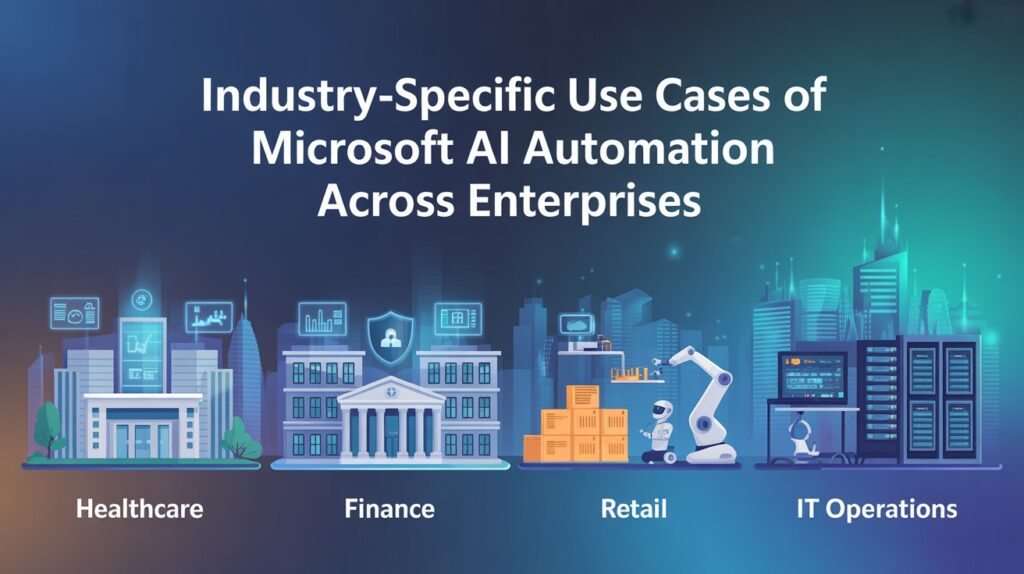
Microsoft’s AI solutions are designed to support different industries with unique operational needs. Instead of offering generic tools, Microsoft enables companies to apply AI automation in ways that directly improve their core business functions. This industry-focused approach allows organizations to move from basic digital tools to full enterprise automation strategies.
Across multiple sectors, Microsoft AI helps automate complex processes such as patient care coordination, financial risk monitoring, supply chain planning, and IT infrastructure management. These real-world applications show how business process automation becomes more effective when combined with intelligent systems that understand data and context.
At a high level, Microsoft AI supports industry automation through:
· Smart decision systems that respond to real-time data
· Automated workflows that reduce manual approvals and delays
· Predictive models that improve planning and resource usage
· AI-driven monitoring that improves reliability and compliance
These capabilities allow organizations to improve performance while keeping operations secure and scalable.
AI Automation in Healthcare Operations
Healthcare organizations manage large volumes of sensitive data and time-critical workflows. Microsoft AI helps hospitals and clinics improve efficiency while maintaining patient safety and regulatory compliance.
Patient Scheduling and Clinical Workflow Automation
AI-driven scheduling systems can predict appointment demand and automatically assign time slots based on doctor availability and patient urgency. This reduces waiting times and improves the use of medical resources.
Clinical workflows such as patient admissions, test requests, and discharge planning can also be automated. By connecting hospital systems with intelligent workflows, staff can spend more time on patient care instead of administrative work.
Medical Data Processing Using AI Models
Medical records, lab reports, and imaging data can be processed using AI models that extract useful insights. This helps doctors review patient histories faster and supports early detection of health risks.
Automation also improves data accuracy by reducing manual entry errors. When medical data flows automatically between systems, healthcare providers can make faster and better-informed treatment decisions.
AI Automation in Finance and Banking
Financial institutions rely on speed, accuracy, and security. Microsoft AI supports intelligent automation that helps banks manage risks while improving customer experience.
Fraud Detection and Risk Automation
AI models analyze transaction patterns to identify unusual behavior in real time. When suspicious activity is detected, automated systems can block transactions or request verification instantly.
This reduces financial losses and helps banks respond faster to security threats without relying on manual monitoring.
Invoice Processing and Accounting Automation
Invoice data can be extracted automatically from documents and entered into accounting systems. Approval workflows can then route payments to the right teams without delays.
This reduces processing costs and improves financial reporting accuracy, especially for enterprises handling thousands of transactions every day.
AI Automation in Retail and E-Commerce
Retail businesses must respond quickly to customer demand and market changes. Microsoft AI helps retailers improve both operational efficiency and customer engagement.
Demand Forecasting and Inventory Automation
AI models analyze sales trends, seasonal patterns, and customer behavior to predict future demand. Inventory systems can then restock products automatically, reducing both shortages and overstock issues.
This leads to better supply chain planning and more stable product availability across stores and online platforms.
Personalized Marketing Automation with AI
Customer data can be used to deliver personalized product recommendations and targeted promotions. Automated marketing workflows ensure that messages are sent at the right time through the right channels.
This improves customer engagement while reducing manual campaign management work.
AI Automation in IT Operations (AIOps)
Modern IT environments are complex and difficult to manage manually. Microsoft applies AI to improve system reliability and reduce downtime.
Automated Incident Detection and Resolution
AI systems monitor application performance and network behavior to detect issues before users are affected. When problems occur, automated workflows can restart services or reroute traffic instantly.
This reduces service outages and improves overall system stability.
Infrastructure Monitoring with Machine Learning
Machine learning models analyze performance data to predict hardware failures and capacity shortages. IT teams can then take preventive action instead of reacting to system breakdowns.
This proactive approach helps enterprises maintain continuous operations while reducing maintenance costs.
Microsoft’s Enterprise Strategy for Secure and Scalable AI Automation
As businesses adopt advanced AI automation, security and scalability become just as important as performance. Microsoft designs its automation ecosystem to support large enterprises that operate across multiple regions, industries, and compliance standards. This ensures that automation can grow with the business while protecting sensitive data at every stage.
Instead of treating security as an add-on, Microsoft builds protection directly into its cloud, AI, and automation services. This helps organizations deploy secure automation without slowing down innovation. At the same time, cloud-based infrastructure allows systems to scale smoothly as workloads increase, supporting long-term digital growth.
Microsoft’s automation strategy focuses on four key enterprise needs:
- Protection of sensitive business and customer data
- Compliance with global and industry regulations
- Ethical and transparent use of AI models
- Continuous monitoring against cyber threats
By addressing these areas together, Microsoft supports enterprise AI security while allowing organizations to expand automation across departments and operations.
Data Privacy and Regulatory Compliance in AI Automation
Data privacy is a major concern for companies using AI-driven systems. Microsoft applies strict controls to how data is collected, stored, and processed across its platforms. Businesses can define who has access to information and how long data is retained, reducing the risk of misuse.
Automation workflows are also designed to follow regulatory rules such as financial reporting standards and healthcare data protection laws. Built-in audit logs and reporting tools help organizations demonstrate compliance during inspections or security reviews.
Another advantage is regional data control. Enterprises can choose where their data is stored to meet local regulations, which is critical for global companies operating in multiple markets. This approach allows businesses to adopt automation confidently while staying within legal boundaries.
Microsoft’s Responsible AI Framework for Ethical Automation
Microsoft follows a Responsible AI framework that focuses on fairness, reliability, transparency, and accountability. This framework guides how AI models are built, tested, and deployed within automation systems.
Before AI tools are used in real business operations, they go through evaluation processes that reduce bias and prevent harmful outcomes. Enterprises also receive tools to explain how AI decisions are made, which improves trust among employees and customers.
Responsible AI is especially important in industries like finance, healthcare, and HR, where automated decisions can directly affect people. By embedding ethical guidelines into its AI platforms, Microsoft ensures that intelligent automation remains safe and socially responsible.
Cybersecurity Integration Across Automated Business Systems
Automation increases efficiency, but it also expands the digital surface that attackers may target. Microsoft addresses this by integrating cybersecurity directly into its automation and cloud services.
AI-based threat detection monitors unusual behavior across systems and can respond automatically to potential attacks. This reduces response times and limits damage before human teams intervene.
Security policies can also be applied across all automated workflows, ensuring that even simple tasks follow enterprise-level protection standards. This unified approach helps organizations maintain consistent security while expanding automation into more business areas.
By combining automation with continuous security monitoring, Microsoft supports scalable systems that remain protected as operations grow.
Key Challenges Enterprises Face When Implementing AI Automation
While AI automation offers strong business benefits, enterprise adoption is not always simple. Large organizations often operate with complex systems, legacy software, and strict regulations, which can slow down automation projects if not handled carefully.
Some of the most common challenges include:
· Poor data quality that limits accurate AI decisions
· Difficult system integrations across departments
· Employee resistance to process changes
· High infrastructure and maintenance costs
These issues do not mean automation should be avoided, but they highlight the need for proper planning and long-term strategy.
Data Quality and System Integration Barriers
AI systems depend heavily on clean and well-structured data. If business data is outdated, duplicated, or stored in disconnected systems, automation results become unreliable. Many enterprises still use legacy software that does not easily connect with modern AI platforms.
System integration is another major obstacle. Automation workflows must communicate across finance, HR, sales, and operations platforms. Without strong integration, processes remain fragmented, reducing the impact of automation investments.
Workforce Upskilling and Change Management Issues
Technology alone cannot deliver successful automation. Employees must understand how to work with new systems and trust automated decisions. Without proper training, staff may resist adoption or use tools incorrectly.
Change management is also critical. Businesses need to clearly explain how automation supports jobs instead of replacing them, especially in people-driven markets like New York. Many teams are already seeing that AI-based tools work best when they assist employees rather than compete with them, helping reduce workload and improve daily productivity. When staff understand that automation is reshaping how work moves across NYC teams rather than eliminating roles, adoption becomes faster and more effective.
Cost and Infrastructure Scalability Limitations
Enterprise automation requires strong cloud infrastructure, data storage, and continuous system monitoring. These resources can become costly, especially for organizations running multiple automation projects at once.
Scalability is also a concern. Systems must handle growing workloads without performance issues. Without flexible cloud support, automation may work well at small scale but fail under heavy demand.
Why Leading Enterprises Choose Microsoft for AI-Powered Automation Solutions
Enterprises today require more than just automation tools they need a complete ecosystem that combines intelligence, security, and scalability. Microsoft has positioned itself as a top choice for AI automation solutions by offering an integrated platform that meets all these requirements.
Organizations adopt Microsoft solutions not only for performance but also for workflow automation that scales across departments and regions. From finance and HR to operations and IT, enterprises can implement intelligent automation consistently and efficiently.
Key reasons businesses choose Microsoft include:
· Centralized cloud infrastructure supporting AI, data analytics, and automation
· Advanced security features and compliance certifications
· Seamless connectivity with existing business applications
· Tools that empower both technical teams and non-technical users
This combination of capabilities allows enterprises to deploy business process automation that is both reliable and adaptable to evolving organizational needs.
Unified Cloud, Data & Automation Platform
Microsoft offers a single, unified ecosystem where cloud services, data analytics, and automation tools work together seamlessly. This unified approach eliminates fragmentation and reduces the complexity of managing multiple tools. Enterprises can access AI models, automated workflows, and real-time insights from one platform, enabling faster deployment and better decision-making.
By centralizing all operations, businesses can scale automation projects across departments, improving efficiency and reducing operational bottlenecks. This unified environment is a key reason why enterprise automation projects succeed with Microsoft.
Enterprise-Grade Security and Global Compliance
Security and compliance are critical for large organizations. Microsoft embeds enterprise AI security directly into its automation platforms. This includes robust access controls, data encryption, continuous threat monitoring, and compliance with global standards like GDPR, HIPAA, and ISO certifications.
Such a secure framework ensures that companies can adopt AI-powered workflows without risking sensitive data or regulatory violations. Businesses also benefit from built-in audit trails and reporting tools, which simplify compliance management.
Seamless Integration with Existing Business Software
Another major advantage of Microsoft is its compatibility with existing enterprise systems. From CRM and ERP platforms to collaboration tools and productivity software, Microsoft’s automation solutions integrate effortlessly.
This seamless integration reduces implementation time and allows enterprises to enhance current workflows instead of starting from scratch. Employees can continue using familiar tools while automation handles repetitive tasks, improving productivity without disrupting daily operations.
By combining intelligent automation with integration, scalability, and security, Microsoft delivers a complete solution for enterprises seeking to modernize operations efficiently.